This project was part of a UCSD's CSE 110 class, and the goal wasn’t to ship a perfect website (our website is quite silly)—it was to practice agile software development, teamwork, and the kinds of processes real teams use (sprints, meetings, ADRs, CI/CD, code quality gates, etc.). The actual “product” we built was a fun vehicle for learning: a Panda Express-themed fortune-cookie ordering game that ends with a fortune (and even shows nutrition totals).
Below is a walk-through of the parts I worked on and what I learned along the way.
The idea, in one sentence
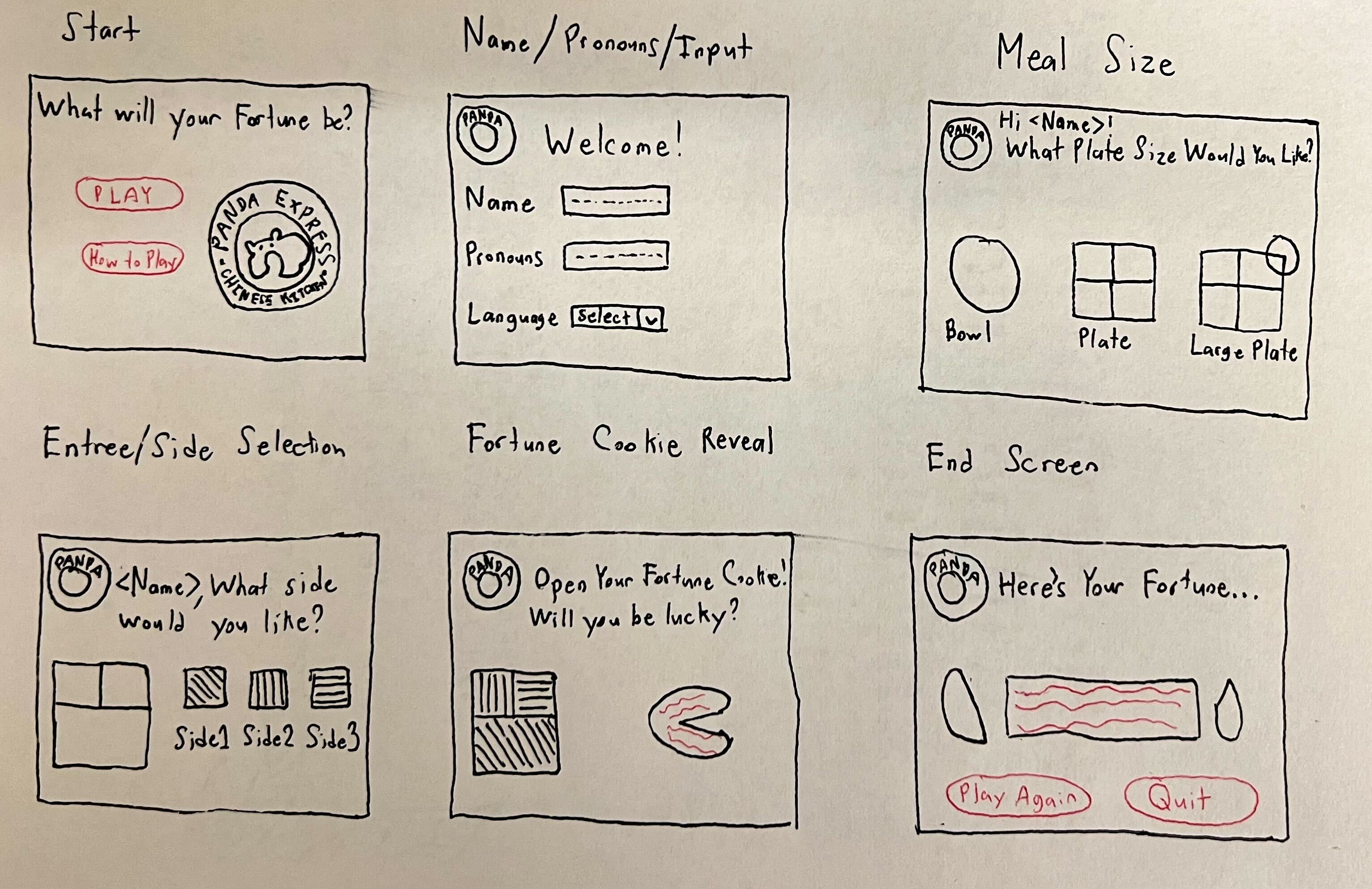
Users click through a mock Panda Express order (meal size → side → entrees), and the choices affect a score that determines what kind of fortune they get—plus we total up nutrition facts and show them at the end.
Agile-first from day one
Instead of “everyone code until the deadline,” we treated this like a mini team project:
- Kickoff + team cadence meetings to set expectations and organize
- A clear pitch + decision points as our scope evolved
- Sprints with reviews and a retrospective
- ADRs (Architecture Decision Records) so decisions were documented instead of forgotten
A few milestones from the meeting notes:
- April 17, 2023 — Kickoff meeting: expectations, repo setup, intro video plan
- April 22, 2023 — Design meeting: theme decisions and feature prioritization
- May 8, 2023 — TA pitch meeting: adjust product flow (force fortune cookie at end)
- May 19–27, 2023 — Sprint planning + review + retrospective
- June 4, 2023 — TA meeting: hard deadlines (code freeze June 12, presentation June 14)
That cadence made the work feel structured—like we were iterating toward something instead of rushing in a panic at the end.
My biggest “process” contribution: CI/CD + quality gates
One of the most valuable parts of the project for me was building out the automation around the code: linting, tests, and making sure every push got checked.
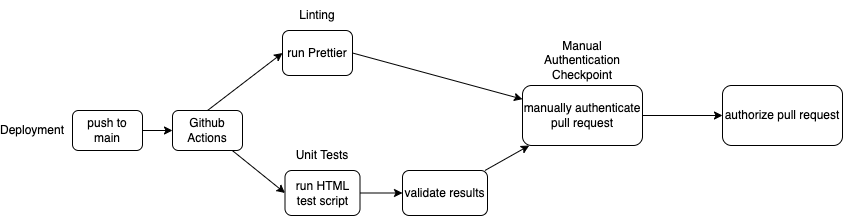
CI pipeline design
We wrote up a Phase 1 CI/CD plan and kept it lightweight: every push should run the same checks so the repo stays healthy.
Linting workflow (GitHub Actions)
We enforced formatting + lint rules via CI so style didn’t become a constant debate in review.
# .github/workflows/linter.yml
name: Lint checker
on: [push]

jobs:
  format:
    runs-on: ubuntu-latest
    steps:
      - uses: actions/checkout@v2
        with:
          ref: $
      - uses: actions/setup-node@v2
        with:
          node-version: "18.x"
      - name: npm install
        run: npm ci
      - run: npm run lint
      - name: Commit changes
        uses: stefanzweifel/git-auto-commit-action@v4
What mattered here wasn’t just “make it green,” but learning how teams reduce friction:
- Prettier keeps formatting consistent automatically.
- ESLint catches common JS issues early.
- Running it on every push makes quality the default, not a last-minute scramble.
Our lint command combined both tools:
"scripts": {
  "lint": "npx prettier --write . && eslint --fix ."
}
Test workflow
Even simple unit tests teach the discipline of verifying behavior as you iterate.
# .github/workflows/tests.yml
name: Tests
on: [push]

jobs:
  tests:
    runs-on: ubuntu-latest
    strategy:
      matrix:
        node-version: [18.x]

    steps:
      - uses: actions/checkout@v2
      - name: Use Node.js $
        uses: actions/setup-node@v2
        with:
          node-version: $
      - name: npm install
        run: npm ci
      - name: tests
        run: npm test
Documenting decisions like a real team (ADRs)
In class projects, it’s super easy to make a big decision in a meeting and then… nobody remembers why two weeks later. ADRs solved that.
Style enforcement decision (Prettier)
We captured why Prettier was worth it: consistent formatting across markdown/JSON/JS/HTML/CSS without endless style arguments.
A decision I specifically owned: JSDocs in a separate repo
One pain point: auto-generated JSDocs didn’t always play nicely with our lint rules. Instead of disabling linting or letting docs break CI, we made an explicit decision:
Generate and host JSDocs in a separate repository so CI can stay strict and clean.
That’s the kind of “engineering compromise” that comes up constantly in real teams: protect the pipeline, keep docs, and avoid flaky failures.
The “product” side: game logic + structure
Even though the site wasn’t the primary learning goal, we still needed something cohesive enough to support our process.
State-driven UI flow
The UI is basically a sequence of pages (front page → meal size → side → entrees → cookie reveal → fortune → nutrition). Instead of navigating routes, we just hide/show sections.
const pages = [
  "front-page",
  "meal-size",
  "side",
  "entree-1",
  "entree-2",
  "entree-3",
  "fortune-cookie-reveal",
  "fortune",
  "nutrition-facts",
];

export function hideAllPages() {
  pages.forEach(
    (page) => (document.getElementById(page).style.display = "none"),
  );
}
That structure made it easy for multiple people to work without stepping on each other: one person could focus on HTML sections, another on CSS, another on the state machine.
The “fortune engine”
The core mechanic is a gameObject that tracks:
score(good/bad choices)weird(chance of weird fortunes)nutritiontotals across selections
getFortune() {
  const weirdness = Math.floor(Math.random() * 4);
  const isWeird = weirdness < this.weird;

  if (isWeird) {
    return this.fortunes.weird[
      Math.floor(Math.random() * this.fortunes.weird.length)
    ];
  } else {
    if (this.score === 3) {
      return this.fortunes.romantic[
        Math.floor(Math.random() * this.fortunes.romantic.length)
      ];
    } else if (this.score < 3 && this.score > 1) {
      return this.fortunes.good[
        Math.floor(Math.random() * this.fortunes.good.length)
      ];
    } else if (this.score <= 1 && this.score >= -1) {
      return this.fortunes.neutral[
        Math.floor(Math.random() * this.fortunes.neutral.length)
      ];
    } else {
      return this.fortunes.bad[
        Math.floor(Math.random() * this.fortunes.bad.length)
      ];
    }
  }
}
Data-driven nutrition
Nutrition info lives in a separate module, which kept the logic clean and made updates trivial:
import nutritions from "../data/nutrition.js";
game.cumulateNutritions(nutritions[dishName]);
Tests: small but meaningful
We wrote unit tests around deterministic parts of the logic (score/weird increments). That’s the right place to start in a project like this: get confidence in the “pure” logic before trying to test the DOM-heavy UI.
import gameObject from "../source/js/fortunes.js";

test("Score should be 1(Increment)", () => {
  const testGame = new gameObject();
  testGame.incrementScore();
  expect(testGame.getScore()).toBe(1);
});
Even basic tests helped reinforce the habit: write code, verify behavior, keep moving.